I've just signed up with Claude AI Pro. Claude can now be connected to Fusion, so I gave it a simple 2D drawing of a platelayers hut and asked it to build a 3D model. It showed initial promise, but then went off the rails. Has anybody with more AI experience had success?

You are using an out of date browser. It may not display this or other websites correctly.
You should upgrade or use an alternative browser.
You should upgrade or use an alternative browser.
3D modelling with AI
- Thread starter Longbow
- Start date
I'm not sure the AI additions to serious CAD programs are really intended to create objects from scratch. I get the impression it's more as design aids for getting tolerances and fits correct etc, but I may be wrong.
The really 'creative' use of AI at the moment for modelling purposes can probably best be found in programs like Meshy and Tripo that will create full meshes from text or image prompts.
The really 'creative' use of AI at the moment for modelling purposes can probably best be found in programs like Meshy and Tripo that will create full meshes from text or image prompts.

Lawrence Boul
Active Member
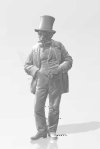
AI has currently reached a point where creating figures from images and text is good. The images do not need to be great, reposing works well and it takes minutes with little skill. Figures here are from historical image and/or text prompt.
The group of figures around the drum are 7mm prints. The rest are 1:64. The 1880 chap shows the work flow where a historical image is extracted, reposed and modelled.
You can certainly criticise the outputs, and there's the odd fail, but overall it's fairly easy to get more or less exactly the figure you want to a detail level that far exceeds most people's ability to paint. I've upped my painting game quite a bit since these images were taken.

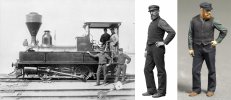

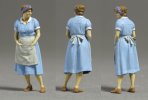
The group of figures around the drum are 7mm prints. The rest are 1:64. The 1880 chap shows the work flow where a historical image is extracted, reposed and modelled.
You can certainly criticise the outputs, and there's the odd fail, but overall it's fairly easy to get more or less exactly the figure you want to a detail level that far exceeds most people's ability to paint. I've upped my painting game quite a bit since these images were taken.

ChrisBr
Western Thunderer
Lawrence,
Those do look remarkable and the abiltiy to take old perod photos and reproduce historically accurate figures will be a boon for almost any period of modelling.
For those of us not yet acquainted with the tools and process, would you be able to provide some guidance on where to start, if not a "here's how I do it"?
Chris
Those do look remarkable and the abiltiy to take old perod photos and reproduce historically accurate figures will be a boon for almost any period of modelling.
For those of us not yet acquainted with the tools and process, would you be able to provide some guidance on where to start, if not a "here's how I do it"?
Chris

Lawrence Boul
Active Member
Thanks Chris
There's some stuff around the web and I've written it up locally. Basically there's some learning (like everything) and the need to subscribe to various AI services. All very possible, but a bit painful if you just want a figure or two.
However, I've taken my experience and packaged it into a simple tool that I hope to make available (for a small fee ;-)). If you are interested in trying the beta version drop me a PM and I'll send you details (currently at my expense).
There's some stuff around the web and I've written it up locally. Basically there's some learning (like everything) and the need to subscribe to various AI services. All very possible, but a bit painful if you just want a figure or two.
However, I've taken my experience and packaged it into a simple tool that I hope to make available (for a small fee ;-)). If you are interested in trying the beta version drop me a PM and I'll send you details (currently at my expense).
Lawrence Boul
Active Member
Never get tired of looking at the Dubs A class. Will get mine built one day.
Off topic: I should finish mine...
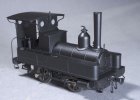
MMW kit (1:64) with some mods. Has ball race bearings, compensated with a 3d printed gearbox case. Needs glazing , weathering and something done with that crankpin.
Built just for fun as it's out of my period of interest. One day I may build a bush tramway, distress it a bit and give it a home.

Brian McKenzie
Western Thunderer

 .
. 
There’s been lots of discussion about this topic here and elsewhere.For those of us not yet acquainted with the tools and process, would you be able to provide some guidance on where to start, if not a "here's how I do it"?
The best thread I’ve found (and contributed to) is on the garden railways forum;
A brief summary of the process is;
You need the best photo possible of the figure you require to use as an ‘Image prompt’ then use an AI model generating web site to create a downloadable STL mesh figure you can print (or even get the site to print it for you ?). Also worth noting that in addition to figures AI generation can make easy work of some simple objects too like loads for wagons or street furniture.
You need a good clear photo of the figure in the pose you require preferably against a plain background with no distractions. Older or poor quality photos can now be enhanced easily by AI.
Use Google Gemini to improve and refine photos requires no fee, extra software or photo editing skills, just some understanding of how to write the best instructions to enhance a photo.
Eg
“Please can you refine and increase the detail and resolution of this photo and give the figure a white background.
Please can you refine and increase the detail and resolution of this photo, recreating the missing part of legs and foot
Can you change the angle of view so that we see him square on.
Please can change this figure’s pose to move his arm away from his body
Please can you create a better higher resolution photo realistic image of this man based on this poor quality image ?”
Once you’ve got the best possible image the rest is easy enough.
The photo needs to uploaded to an AI mesh creation web site that creates mesh figures from images (you can use text prompts, but the results are often much poorer) and then it creates the figure for you to download. Some services have a free try out option or an option to use an older version to make some samples to give you an idea about the process, but you won’t be able to download the highest quality results unless you take up a subscription.
To get the ultimate quality you’ll need a subscription.
Meshy.ai is generally regarded as the best currently. There’s usually a half price first month offer, as first time user you’ll also be offered extra free credits for trying features and writing reviews. With some pre-planning you could get hundreds of figures in that first month, so it’s worth getting all the photo prompts ready before starting a subscription. You can also end the sub after a month too.
Tripio3 is almost as good as Meshy and if you sign up to Makerworld you can use it freely.
It makes life easier later if you specify the figure’s height for download. You may also need to run the mesh figure through a repair routine it fix any odd non-manifold errors. MS 3D Builder works well and some slicers have a repair function and will flag up issues before repair.
Then print. Resin is probably the best option, but larger scales G3/16mm/ft etc figures can be successfully printed with a 0.2mm nozzle at 0.05 layer height on a FDM printer with good results.
Above are the basics and the process is really pretty simple to start with.
Beyond that using other 3D software allows further editing; Maybe smoothing creased clothing, some simple edits and, most useful of all, the ability to re-pose figures. Blender is the best known and free, but is a pretty intimidating program, even for experienced computer users. However there are some very good YouTube tutorials that go through the procedures step by step and are reasonably easy to follow.